MCP / AI Engine Settings
Where to configure
Open:
Settings > MCP Settings
This page controls the OpenPostings MCP application agent (AI service engine behavior).
Installer dependency
For MSI installs, MCP runtime is included when you choose:
Complete, orCustomwithMCP Apply Agent Server (AI Service Engine)enabled
Core safety toggles
Enable MCP application agent: master switch for MCP candidate/apply endpoints.Dry run only (do not submit): records payload preview without committing applications.Require final user approval: blocks commit unless explicit approval is provided.
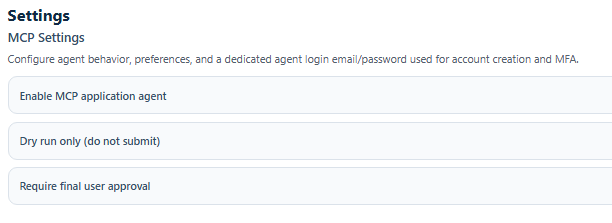
Agent identity and login fields
Preferred agent labelAgent login emailAgent login passwordMFA/login notes
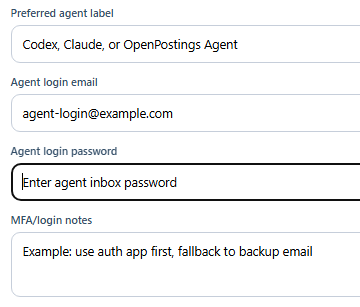
Use a dedicated mailbox account for automation workflows.
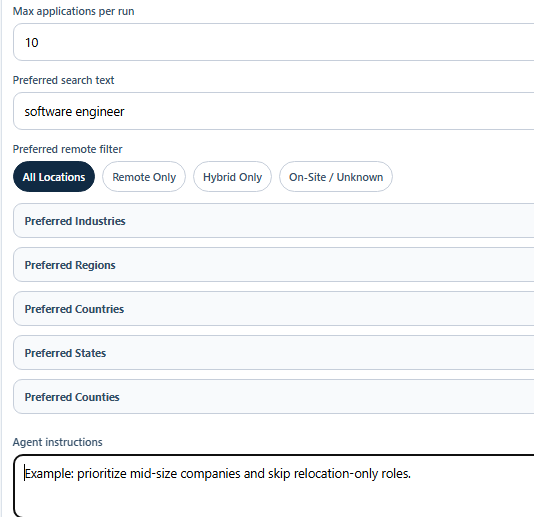
Throughput and targeting fields
Max applications per runPreferred search textPreferred remote filterPreferred IndustriesPreferred RegionsPreferred CountriesPreferred StatesPreferred CountiesAgent instructions
Save behavior
When MCP settings are saved:
- Settings are persisted through
/settings/mcp. - OpenPostings runs a preview candidate query.
- UI confirms with match count:
MCP settings saved. <count> candidate postings currently match.
API endpoints tied to this page
GET /settings/mcpPUT /settings/mcpGET /mcp/candidatesPOST /mcp/cover-letter-draftPOST /mcp/applications/complete
Security note
MCP settings, including credentials, are stored in local SQLite fields by default. Use OS-level hardening if you need stronger controls.