Windows Tray Notification Settings
Important behavior note
OpenPostings does not currently expose tray behavior in the in-app settings UI.
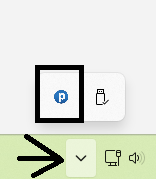
Tray behavior is controlled by:
- installer feature selection, and
- tray context menu actions
When tray is available
Tray support is installed with the Backend Service Worker MSI feature.
What the tray shows
Tray tooltip/status includes both services:
- Backend state (
running,disconnected,stopped) - AI Service Engine state (
running,ready,stopped,not installed)
Tray menu actions
Right-click tray icon to access:
Open OpenPostingsRestart BackendStop BackendRestart AI Service EngineStop AI Service EngineExit Tray
Double-clicking tray icon opens the desktop app.

Runtime paths (per user)
Under %LOCALAPPDATA%\\OpenPostings\\backend:
jobs.db(runtime DB copy)backend.pidai-engine.pidlogs\\backend.out.loglogs\\backend.err.loglogs\\ai-engine.out.loglogs\\ai-engine.err.loglogs\\tray.log
Practical operations
- If app data stops refreshing, try
Restart Backendfrom tray. - If MCP tool calls fail and MCP is installed, try
Restart AI Service Engine. - If tray is missing after install, verify Backend Service Worker feature is installed.